projects/snapdragon
12 Nov 2026 - 12 Nov 2026
- From projects/thirdmind ui spec, realized these ideas would be really useful in a web browser plugin.
Self-commentary I want to be able to select a chunk of text (block or otherwise) and comment on it. and have that commetn be separate. Prob rendered as a sidenote. Or a sub-bullet point but I want the temporal flow clear. Could just put in a subblock, but the point is I am in dialog with my earlier self and want those voices distinguished.
AskClaude Like current one in Logseq, but let me fucking select what I want to use for the prompt
Do the above, but on random web pages OK getting off the thirdmind topic but that's OK. Radically simple ide: web plugin that lets you select text, say to Claude ELI or whatever, have an annotation created, remembered, tracked. I just want this for me although a social version would be easy and very useful (of course this has been tried.) Something like this must exist? Would be super-easy to build.
- Ask Claude
- Yes, pieces of this exist — but not quite the full thing you're describing, especially the temporal/voice distinction (you vs. your earlier self vs. Claude). Here's the landscape:
What exists
- **Closest to your personal annotation + AI idea:**
- LightUp —
- an experimental browser extension that brings AI-powered annotations directly to any webpage; highlight text and get explanations or analysis.
- No persistent anchored notes though.
- Fabric —
- highlight text, annotate images, leave persistent notes on any web page; comments attach to specific text passages, and annotations persist across visits.
- Annotations are automatically organized by AI, and your AI assistant can access your web annotations.
- This is probably the most polished "personal research layer on the web" product.
- PageNote (GitHub) —
- lightweight local-first Chrome extension; select text, annotate with color and notes, saved in a local database and replayed on revisit. Exports JSON, which makes it possible to persist annotations into Obsidian or Anki.
- Nexio AI sidebar extension —
- a Claude-powered sidebar injected into every webpage; "explain selection — highlight any text, get an explanation," plus chat and summarize modes.
- Does the AI-on-selection part but doesn't persist anchored annotations.
- For the "ask Claude about selected text" part specifically:
- Technically trivial to wire up: Manifest V3, Shadow DOM for UI isolation, service worker for Claude API calls, with the
anthropic-dangerous-direct-browser-accessheader to avoid CORS.
What's missing / the gap
- None of these do the thing you care about most: distinguishing temporal voices. The idea that an annotation anchored to text has:
- The source text
- Your note (timestamped)
- Claude's response (tagged as Claude)
- Your later reply to that (tagged as you, later)
- ...rendered as a sidenote thread with authorship visible — that's not a thing any of these do. Fabric comes closest with
- threaded annotations anchored to content
- , but it's not AI-dialogue-aware.
Build difficulty
- Genuinely low. The hard parts are all solved:
- Text selection → anchor: use W3C
TextQuoteSelector(same thing Chrome's#:~:text=uses)
- Persistent storage:
localStorageper URL or a small backend
- Claude call on selection: trivial with the API
- Sidenote rendering: inject a Shadow DOM panel
- The only non-trivial design question is exactly what you flagged: how to represent the dialogue thread (you / Claude / future-you) in a way that makes temporal flow legible. That's a UI problem, not a technical one.
LightUp review
- Needs Brave blocker turned off
- Still didn't work. Ah OK, you hit a control, it gives you a choice of conversational relations:
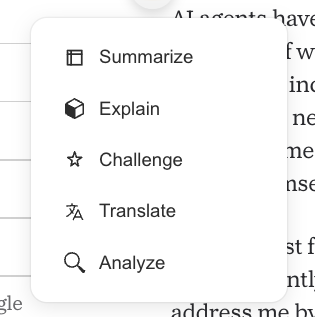
- These are all meant to be ai prompts, not human commentary. I guess integrating them is a me-ish idea.
- Well couldn't get their open (no key) version to work, and openai didn't work, so giving up. Project is a year or so untouched so might be dead.
- am i missing anything? Any other plugins in this class?
- Ask Claude
- Here's a rundown of the active alternatives in the Logseq AI plugin space:
Actively Maintained
- logseq-copilot (by Logan Yang, same author as Copilot for Obsidian) —
- the recommended Logseq AI plugin in 2026, configured to point at Ollama. It adds chat blocks via
/copilotslash command, inline rewriting, and journal-aware prompts directly inside Logseq's outliner.
- AssistSeq (
logseq-plugin-assistseq-ai-assistant) —
- automatically reads your current document and indexes all related notes, then uses this context to engage in conversations through a chat interface.
- Supports Gemini, OpenAI, Ollama, and Groq.
- Last updated November 2025 per the marketplace.
- logseq-plugin-ai-assistant (by ahonn) —
- features seamless Logseq integration, customizable prompt support, easy-to-use built-in prompts, and a custom OpenAI base path.
- Still actively released, with v1.6.0 in February 2025.
- logseq-plugin-ds —
- calls any OpenAI-compatible Chat Completions endpoint from a slash command, right inside a Logseq block.
- Supports local servers too.
- logseq-ollama-plugin-ai-assistant —
- specifically built for local AI models like Meta's Llama3 via Ollama, allowing you to generate or transform text using custom prompts.
Older / Less Certain Status
- logseq-plugin-gpt3-openai (by briansunter) —
- a plugin for GPT-3 AI-assisted note-taking in Logseq, using OpenAI's
gpt-3.5-turbomodel by default.
- One of the oldest and most starred, but likely stale given its GPT-3 framing.
- logseq-plugin-copilot (by chhabrakadabra) — listed in awesome-logseq as a way to
- "talk to AI about your Logseq notes,"
- but activity is unclear.
Beyond Plugins: MCP Approach
- If you're open to a non-plugin approach,
- Matryca (matryca-logseq on PyPI) is a local-first MCP server and CLI companion designed natively for Logseq Markdown graphs
- — letting external AI tools interact with your graph directly.
- Bottom line: AssistSeq and logseq-copilot are your best bets right now — both actively maintained, both support local models via Ollama, and both have the graph-context-awareness that LightUp was going for.